Vulcano
Vector databases represent a critical component for AI-centric software. We use them to find data that is contextually or conceptually similar, which is a key step in applications like recommendation systems, retrieval-augmented generation, or agentic applications.
In text-based systems, vector databases play a fundamental role in preserving the contextual structure via semantic search, ensuring that only relevant information is retrieved.
At its core, a vector database is relatively simple. Of course, a production-ready one is a substantial project — mainly because of requirements not directly related to vector similarity search, such as multi-user support or scalability.
I wanted to explore how these types of systems work, and the best way was to build one myself. Introducing VulcanoDb!
(“Vulcano” is the Spanish name for Vulcan, the roman god of fire 🔥)
VulcanoDb, The Minimalistic Vector Database
VulcanoDb is a minimalistic vector database, to be used when a full-featured system is too much. The project is open source, published under the Apache2.0 license.
Let’s discuss the main requirements.
In-Process execution
This vector database is aimed at projects that require semantic search but would prefer not to connect to external systems. As long as you don’t need any of the fetures mentioned above (multi-user, cluster deployment, etc), having your data in the same process as your application will be the most convenient approach, and will provide the best performance.
VulcanoDb can be installed as a standard project dependency in any Java-based system. It is written entirely in Java and has no transitive dependencies.
Minimalistic
The project covers only the critical functionality, without adding unnecessary complexity:
- Document definition, as a collection of fields of the basic data types: vectors, strings, integers.
- In-memory data. Other storage implementations could be implemented if a valid use case is found.
- Simple queries:
- Vector Similarity (initially cosine similarity, more can be added),
- String operations (CONTAINS, STARTS_WITH, ENDS_WITH, EQUALS),
- Integer operations (>,>=, <, <=, ==)
- Composite queries (AND, OR)
This ensures a simple engine and fast execution performance.
Flexible Architecture
VulcanoDb has a very simple design with five main concepts:
- A Document is a collection of fields with a unique identifier.
- A Field is a value stored as part of a document. It has a key and a value of one of the supported types.
- A DataStore is the component that contains all the documents, and is responsible for executing queries.
- A Query is a function that receives a Document and returns a score. There are different types of queries, applicable to the supported field types.
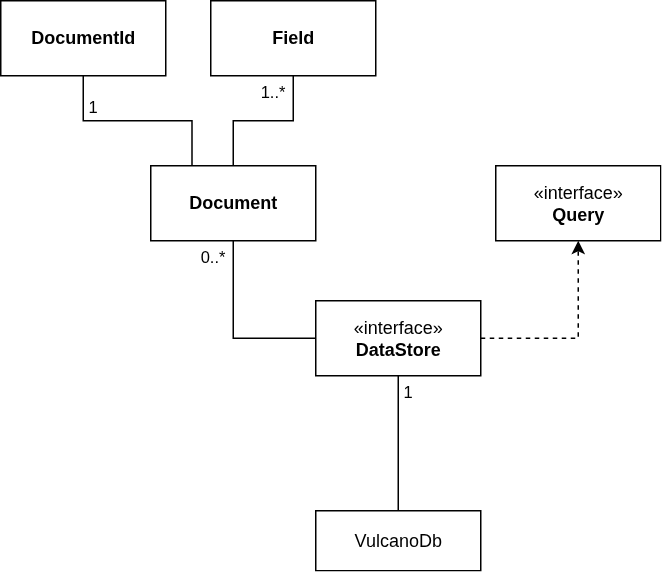
As always, I started with a very naive implementation of each one of the interfaces, then evolved some of them as required for efficiency. For DataStore in particular, the current implementation keeps data in memory, using a ConcurrentHashMap. Parallel Streams are used to evaluate queries, for the best performance.
How to use VulcanoDb
First, you will need to create an intance of the database. The builder can be used to customize it:
//Build a database instance:
var db = VulcanoDb
    .builder()
//    .withDataStore(...) <- to be used when other data stores are supported
    .build();
Adding documents to the database implies the use of the document builder, and the add(Document) method:
//Create a document:
var document1 = Document.builder()
        .withStringField("category", "category 1")
        .withIntegerField("version", 1)
        .withVectorField("embedding", ...)
        .build();

//Add the document to the database
db.add(document1);
Once the documents are stored, you can issue queries to search any of the fields. In addition to the vector similarity for vector fields, simple comparisons are supported for string and integer fields:
//Create a query
var searchText = "..."
var embedding = generateEmbeddings(searchText)

var query = Query
    .builder()
    .isGreaterThanOrEqual(1, "version")
    .isEqual("category 1", "category")
    .isSimilarTo(embedding, "embedding")
    .build()

//Search documents and show the results
var result = db.search(query);
result.getDocuments()
        .forEach(it -> IO.println("[%.2f] %s".formatted(it.score(), it.document().id())));
The output of this code will be similar to this:
[0.72] e7913417-0f6d-434d-9d2b-7605c80d35dc
[0.54] f68c1e1e-4e79-4173-838d-d49fe7a88855
[0.54] 49900a5d-9985-41c8-a3a9-77f6e4530326
[0.50] a4c120e9-e1d1-448a-97ce-64e969c01623
[0.50] 23eebac1-fca8-4a4a-bdf1-2dc25061454c
[0.41] 2a2a7a6f-3c89-4650-8e83-e813287a8d96
A complete usage example can be shown in the SentenceEmbeddingTest class.
VulcanoMCP, The MCP Server
What can you do with a ligth-weight, in-process vector database? I will go first: you can create an MCP server that an agent can use to find relevant documents in your hard drive without having to navigate through all of them.
And that is exactly what the vulcano-mcp module is.
As I explained in a previous article, thanks to the Micronaut framework and Micronaut MCP, creating an MCP server is nearly trivial. Let’s see how this works.
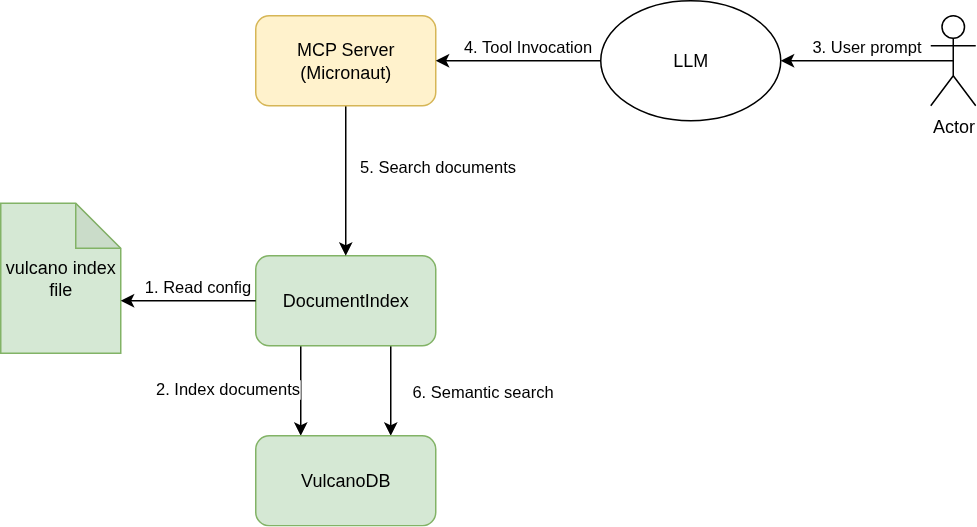
The MCP server needs an index file provided as input, that lists all the relevant files and includes a description about their content.
To add the MCP server to your agentic application you will need to add it to your configuration file:
{
  //... other config ...

  "mcpServers": {
    //... other mcp servers ...
    "vulcano-mcp": {
          "type": "stdio",
          "command": "/path/to/bin/java",
          "args": [
            "-jar",
            "/path/to/VulcanoDB/vulcano-mcp/target/vulcano-mcp-0.1.jar"
          ],
          "env": {
            "VULCANO_MCP_INDEX_FILE": "/path/to/vulcano-mcp.yaml"
          }
        }
  }
}
That index file is a list of the documents you want to expose, with a description of each one (see here for an example):
vulcano:
  artifacts:
    file1:
      path: files/file1.txt
      description: |
        Vulcano (Sicilian: Vurcanu) or Vulcan is a small volcanic island [...]
    file2:
      path: files/file2.txt
      description: |
        In computing, a database is an organized collection of data or a type of data store based on [...]
Upon initialization, the server will read that file and store its content in a Vulcano database instance. Then it will expose a single tool, getRelevantFiles to the agent to use.
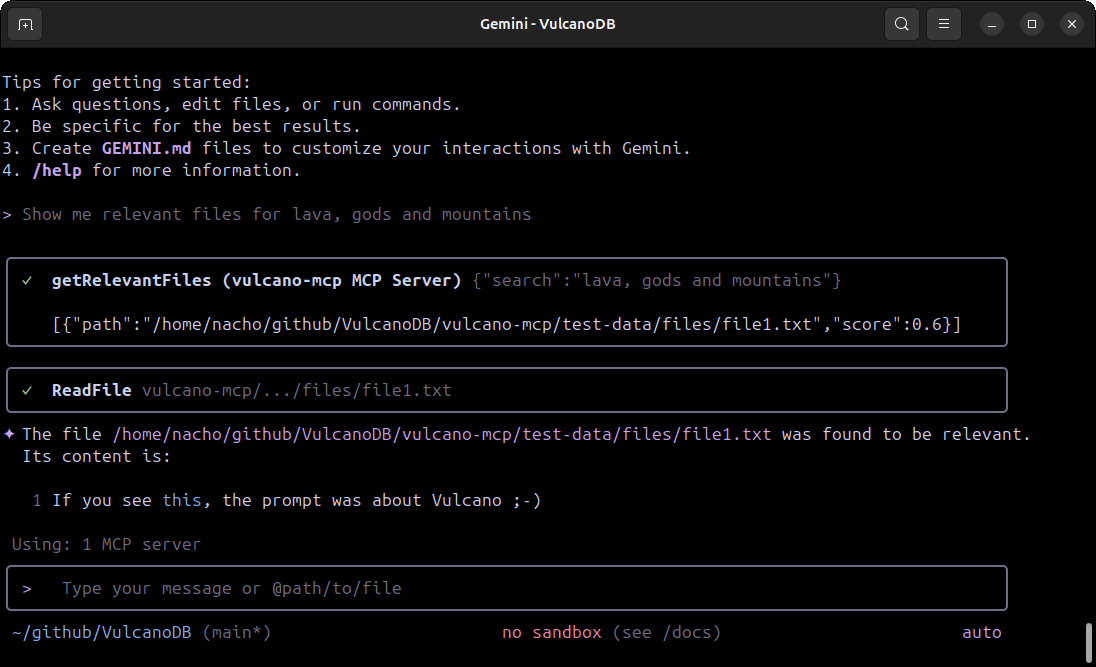
When prompted for relevant documents to a given topic, the LLM will use the MCP server to identify which ones to read. This screenshot shows the MCP in use with Gemini-Cli:
Conclusion
I am on a journey to learn about modern AI tools and the principles that underpin them. Years ago I wrote about Deep Learning and built a simple artificial neural network in Typescript, to understand how these models are trained and how gradient descend algorithm works. More recently, I wrote about retrieval-augmented generation and built a multi-agent system to introduce myself to LLMs and how they are used to power different types of applications.
Then I focused on semantic search — a topic that has always resonated with me because it connects back to my physics background, much like the gradient-descent technique. I built VulcanoDb to understand the problems that vector databases solve and some of their solutions. As always, it is open source under the Apache 2.0 version, so anyone can use it freely.
Thanks for reading!